Email aliases, take back control of your mails
Published on 10 min read
Updated on
In this series20 min read in total
- Email aliases, take back control of your mails
- Reducing Your Attack Surface on Discord
- Useful Links for Privacy and Security
An email alias is a public address that you hand out instead of your real one. A relay service receives mail sent to that address and forwards it to the mailbox you actually read, so the sender never learns where the message lands. Because each alias is disposable and independent, a leak, a data sale, or a wave of spam stays contained to one address that you can disable without touching the rest of your identity.
Most people treat their email address like a phone number: one value, given to everyone, impossible to change without pain. That single address becomes the join key that links your bank, your forums, your shopping accounts, and every breach that has ever touched them. An alias breaks that link. This article explains how aliases work at the protocol level, from the forwarding relay to reverse-alias replies and the authentication that keeps forwarded mail out of the spam folder, then states plainly what the model protects and what it does not.
How an email alias works
An alias is not a second mailbox. It is a routing rule hosted by a Mail Transfer Agent (MTA), the software that accepts and relays email, run by an alias provider such as SimpleLogin (owned by Proton) or Addy.io (formerly AnonAddy). The provider publishes a Mail Exchanger (MX) record, the Domain Name System entry that names the server responsible for a domain’s mail, so that every message addressed to an alias is delivered to its relay first, not to you.
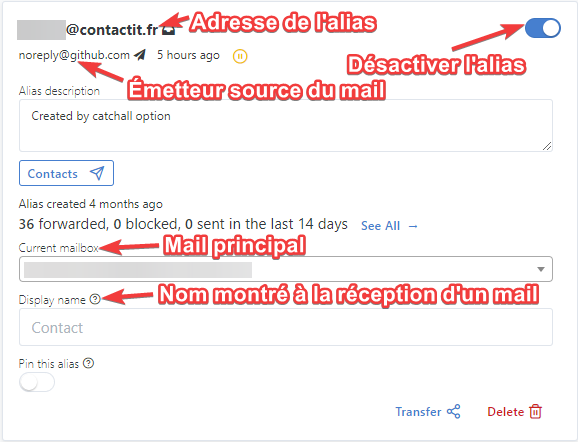
From there the relay applies a mapping: shop@youralias.com forwards to your real mailbox, news@youralias.com forwards to the same place, and so on. One private mailbox sits behind many public addresses. Aliases come in two shapes. Individually created aliases are registered in advance through the provider’s app or browser extension. A catch-all domain accepts any local part on the fly: with *@yourdomain.com pointed at the relay, you can invent random-2026@yourdomain.com at the checkout page and it works immediately, with no prior registration.
The value of the model is the mapping itself. Because each service gets its own address, a leak is self-attributing: if shop@youralias.com suddenly receives casino spam, you know which company sold or lost your data, and you can revoke that one address while every other alias keeps working.
The forwarding path, step by step
When someone writes to your alias, the message does not travel straight to you. It follows the relay through a short sequence of transformations that a Simple Mail Transfer Protocol (SMTP) conversation, the protocol that moves mail between servers, makes possible.
The relay does not simply copy the message. Two identities in every email must be understood to see why. The envelope sender, the address given in the SMTP MAIL FROM command, controls bounces and authentication; it is invisible to the reader. The From header, the visible sender line, is what your mail client displays. When the relay forwards, it rewrites the envelope sender to its own domain (so downstream authentication can pass, as the next section explains) while preserving the original From header so you still see who wrote to you. It also sets a Reply-To header pointing at a reverse-alias, the return address that makes anonymous replies possible.
If you enabled it, the relay can also encrypt the message with Pretty Good Privacy (PGP), the standard for public-key email encryption, using your public key before forwarding. Providers that do this store nothing readable: SimpleLogin encrypts each inbound message to your key so that only your private key can open it, and Addy.io offers the same per-recipient OpenPGP option. You give the relay only your public key, never your private one.
Replying without exposing your address
Forwarding solves inbound mail. Replies are the harder half: a naive “reply” from your mailbox would send straight from your real address and undo the whole point. The reverse-alias exists to prevent that.
The mechanism is described in the SimpleLogin reverse-alias documentation: “when you reply to the email, you are actually replying to the reverse-alias. SimpleLogin will then send the email from your alias and your real mailbox address stays hidden.” A reverse-alias is created automatically for every contact who writes to one of your aliases, and it looks like a random address such as ra+abcdef123456@simplelogin.co or, optionally, one that embeds the contact, like contact_at_example_com_xyz@simplelogin.co.
Two properties make it safe. It is per contact, so one reverse-alias only ever reaches one correspondent. And it is owner-bound: the relay accepts a message to a reverse-alias only when the envelope sender is one of your verified mailboxes, so a stranger who guesses the address cannot use it to send mail as you.
Deliverability: why forwarding is hard
Forwarding fights with modern anti-spoofing rules, and understanding why explains most alias-delivery problems. Three mechanisms guard a sender’s domain. Sender Policy Framework (SPF), defined in RFC 7208, lists the IP addresses allowed to send mail for a domain. DomainKeys Identified Mail (DKIM), RFC 6376, attaches a cryptographic signature over the message. Domain-based Message Authentication, Reporting and Conformance (DMARC), RFC 7489, tells receivers what to do when SPF or DKIM fails and, crucially, requires alignment between the authenticated identity and the visible From domain.
Here is the problem. SPF checks the connecting IP against the envelope domain. When the relay forwards, the connecting IP is now the relay’s, not the original sender’s, so if the relay keeps the original envelope, SPF fails at your mailbox. The fix is the Sender Rewriting Scheme (SRS), which rewrites the envelope sender into the relay’s own domain (a form like SRS0=hash=timestamp=origin.com=user@relay.com) so SPF evaluates against an IP the relay controls. DKIM behaves differently: a signature survives a plain forward because it covers message content, but it breaks the instant the relay alters the body, for example by adding a footer, so a careful relay re-signs the message under its own domain. The result is that DMARC finds an aligned identity (the relay’s) and delivers the message instead of rejecting it. Some ecosystems also use the Authenticated Received Chain (ARC), RFC 8617, which lets a forwarder vouch for the authentication results it saw before rewriting.
The practical takeaway: alias deliverability depends on the provider getting SRS and DKIM re-signing right. A provider that does this well lands in the inbox; a misconfigured or self-hosted relay that skips it lands in spam.
Plus addressing is not a real alias
A common shortcut is subaddressing, described in RFC 5233 as adding a +detail tag to the local part: you+shop@gmail.com still delivers to you@gmail.com. It looks like an alias but fails as a privacy tool for two reasons. First, the base address is right there in the string, so anyone who receives you+shop@gmail.com can strip the tag and recover you@gmail.com, defeating the isolation an alias is supposed to provide. Second, many sign-up forms reject the + character outright, so it is not even reliable. A real alias hides the destination completely; a plus tag only annotates it.
Advantages
- A service breach does not leak your main address, only a disposable one.
- Your real address stays unknown to recipients, and you hold many easy-to-manage addresses instead of one.
- Any alias can be deactivated or deleted the moment it starts attracting spam.
- Catch-all support lets you invent addresses on your own domain without pre-registering them.
- One alias can fan out to several mailboxes at once, acting as a small mailing list.
- Browser extensions and password managers generate aliases inline; ProtonPass integrates SimpleLogin directly.
Disadvantages
- You depend on the relay: if it is down, forwarding stops and mail may bounce.
- The relay can see every message that transits it, so it becomes a single point of trust (PGP protects content, not metadata).
- Free plans cap sending, bandwidth, and alias count (Addy.io in particular).
- Attachments are usually limited to around 25 MB; for larger files use a service such as SwissTransfer.
What an alias protects, and what it does not
An alias is a routing and compartmentalization tool, not an anonymity cloak. Keeping the boundary explicit prevents overtrust.
| Concern | What the alias does | What it does not do |
|---|---|---|
| Real address secrecy | Hides your mailbox from senders behind a forwarding address | Does not hide it from the relay, which must know where to deliver |
| Spam and breach isolation | Contains a leak to one revocable address and names the source | Does not stop the leak; the alias was still exposed |
| Content confidentiality | Optional inbound PGP encrypts mail to your key | Does not encrypt your replies, subjects (usually), or metadata |
| Availability | Lets you retire a burned address instantly | Adds a dependency: an outage at the relay stops your mail |
| Identity linkage | Breaks the single shared address that joins your accounts | Does not anonymize what you write, or protect against a subpoena to the provider |
Read as a whole, an alias raises the cost of profiling you and gives you a kill switch per relationship. It does not make your mail anonymous, and it moves trust to the relay operator rather than removing it.
Choosing a provider
| SimpleLogin | Addy |
|---|---|
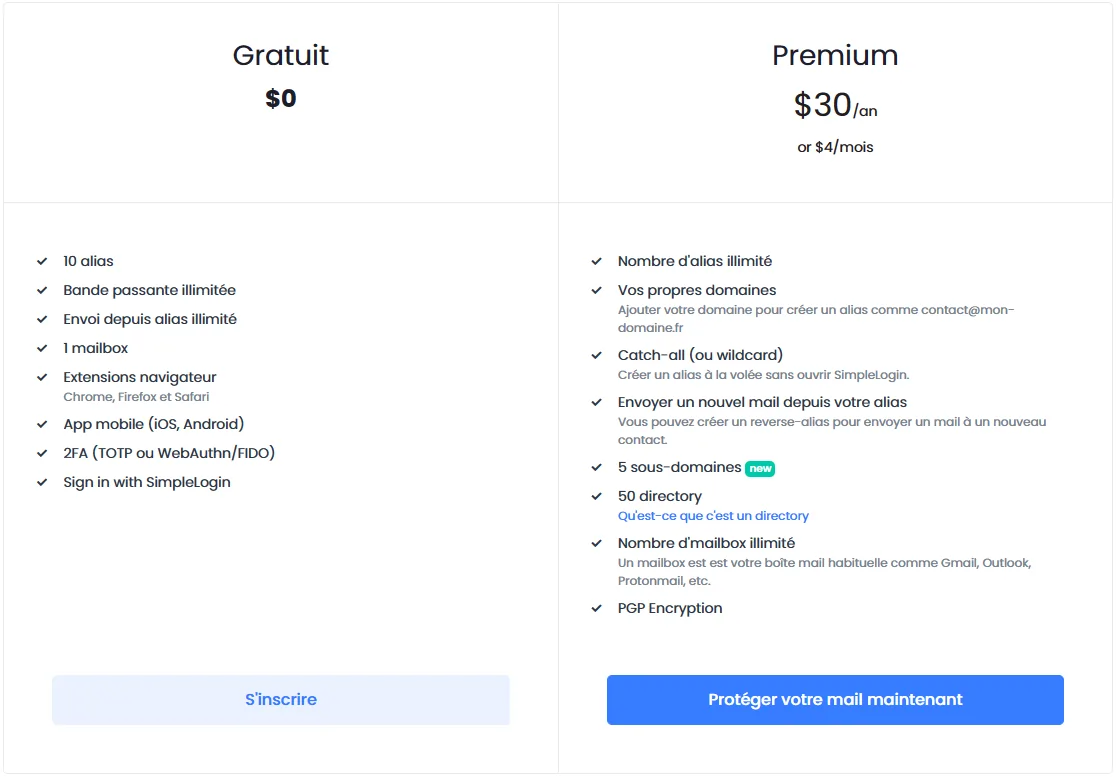 | 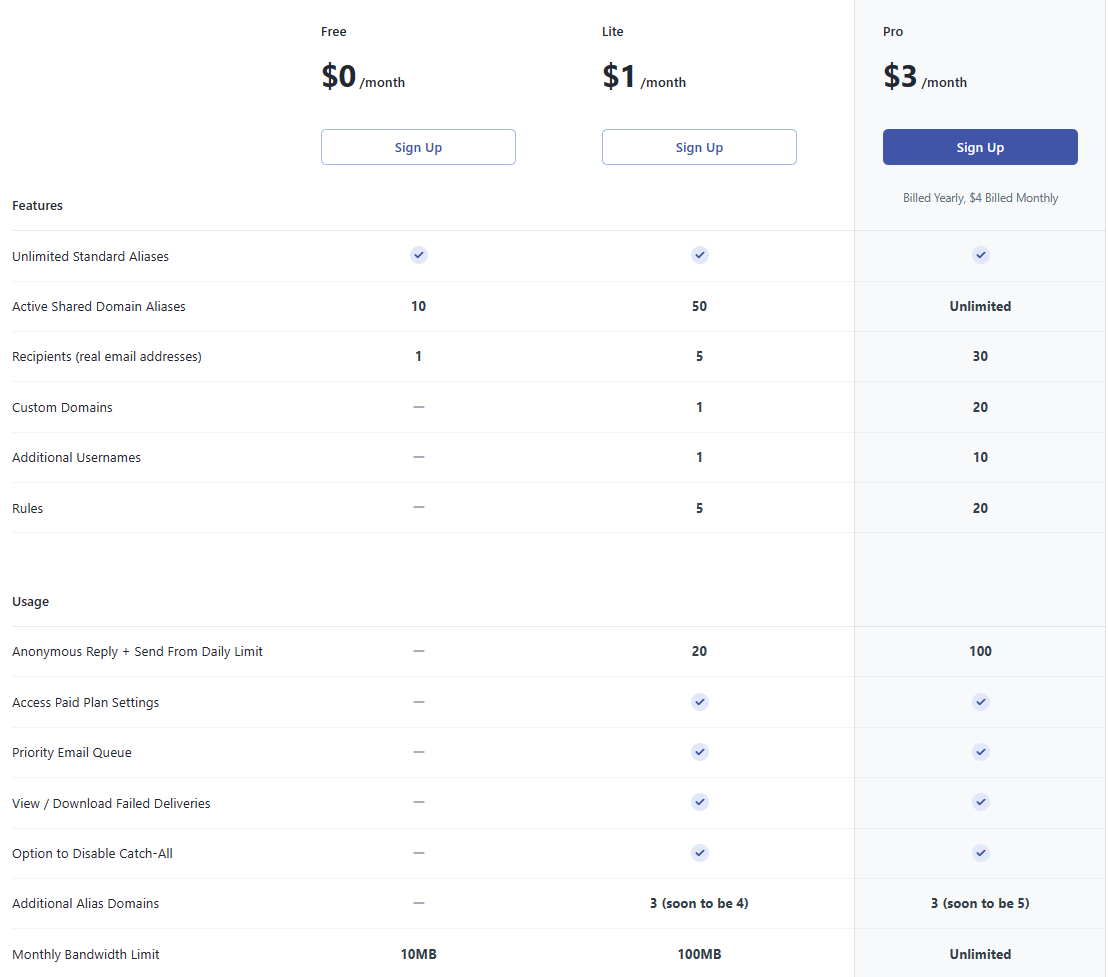 |
SimpleLogin offers the broadest feature set, was acquired by Proton, and is included for Proton subscribers. Addy.io is a strong alternative, is fully open source under AGPL-3.0, and is self-hostable via Docker on a Laravel and Postfix stack if you would rather run the relay yourself. Both support custom domains, catch-all, and per-recipient PGP. Self-hosting removes the third-party trust concern but makes you responsible for the SRS and DKIM configuration that keeps mail deliverable.
References
- IETF, RFC 5321: Simple Mail Transfer Protocol, 2008.
- IETF, RFC 5322: Internet Message Format, 2008.
- IETF, RFC 5233: Sieve Email Filtering, Subaddress Extension, 2008.
- IETF, RFC 7208: Sender Policy Framework (SPF), 2014.
- IETF, RFC 6376: DomainKeys Identified Mail (DKIM) Signatures, 2011.
- IETF, RFC 7489: Domain-based Message Authentication, Reporting, and Conformance (DMARC), 2015.
- IETF, RFC 8617: The Authenticated Received Chain (ARC) Protocol, 2019.
- SimpleLogin, Reverse-alias documentation and PGP encryption.
- SimpleLogin, source code, AGPL-3.0.
- Addy.io, FAQ and self-hosting guide.
- Addy.io, source code, AGPL-3.0.