Reducing Your Attack Surface on Discord
Published on 8 min read
Updated on
In this series20 min read in total
- Email aliases, take back control of your mails
- Reducing Your Attack Surface on Discord
- Useful Links for Privacy and Security
Have you ever heard of “DOX/DOXXING/SWAT”? Understand how these practices work and protect yourself!
The act of “DOX” involves sharing personal information about someone without their consent, with the intent to harm them.
The technical principle behind this term is OSINT. Open Source Intelligence (OSINT) is a legal reconnaissance practice aimed at gathering information about a physical or legal entity from open sources. It is used by cybersecurity professionals, government agencies, authorities… It’s not niche but a very powerful and widely used practice.
- Websites/apps and social networks (your accounts on these platforms) and, by extension, the content you share on them.
- Search engines (Google, Bing, Duckduckgo…).
- Leak databases (services/sites compromised where information has leaked online), which fall outside the scope of OSINT (illegal data possession).
- White/Yellow pages and other directory listings.
- Specialized sites and tools (Mr.Holmes, Maigret, Holehe, Maltego, whatsmyname.app, intelx.io…) that facilitate the collection of information from multiple sources in one place.
As you’ve understood, OSINT is an investigative process that is primarily PASSIVE (excluding phishing, “token grab,” or any so-called “active” actions). This means the target will not be informed of this process, making it even more dangerous.
This article aims to provide elements to prevent information gathering and control the exposure of your Discord profile.
In short, most of the work can be done by using a fake identity, email address, phone number, and sharing the minimum amount of information possible to reduce your digital footprint, at least on Discord.
There are different entry points:
- Username.
- All your previous usernames.
- Biography.
- Profile picture.
- Linked accounts (social networks, Spotify, games…).
- User ID (accessible via developer tools).
- The email used during Discord registration.
Common sense is just as important:
-
Do not share any personal information (spoken, written, screen share, or webcam) on Discord.
-
With no one, including friends, acquaintances, family members or colleagues.
-
Do not scan any QR code, especially if it’s offered for verification purposes on a server.
-
Be wary of “try my game” messages that come with an executable or a link, even from a friend: it is a classic malware and token-grab vector, and the friend’s account is often compromised itself.
ZONE 1 (Easy)
- Don’t use the same username on all your platforms; prefer a unique username for Discord.
- Limit yourself to the bare minimum in your biography, no Linktr.ee or links to your social networks.
- Avoid token grabs, cookie stealers, or IP loggers: do not click on ANY LINK in Discord (even YouTube! copy/paste or rewrite the title instead), open it in another browser (if possible, one specifically set up for this purpose - sandboxed or, better yet, use an online sandbox service).
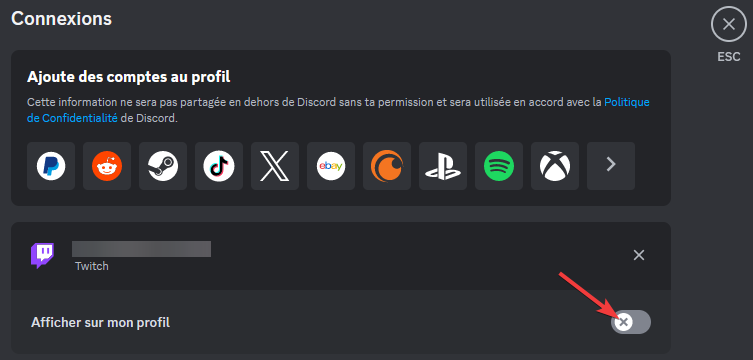
- Don’t link your gaming and site accounts to Discord! All applications linked to your profile, such as bots or accounts, will see information about it (especially linked accounts, which can leak your profile, email, name/first name… (if used on the linked services)).
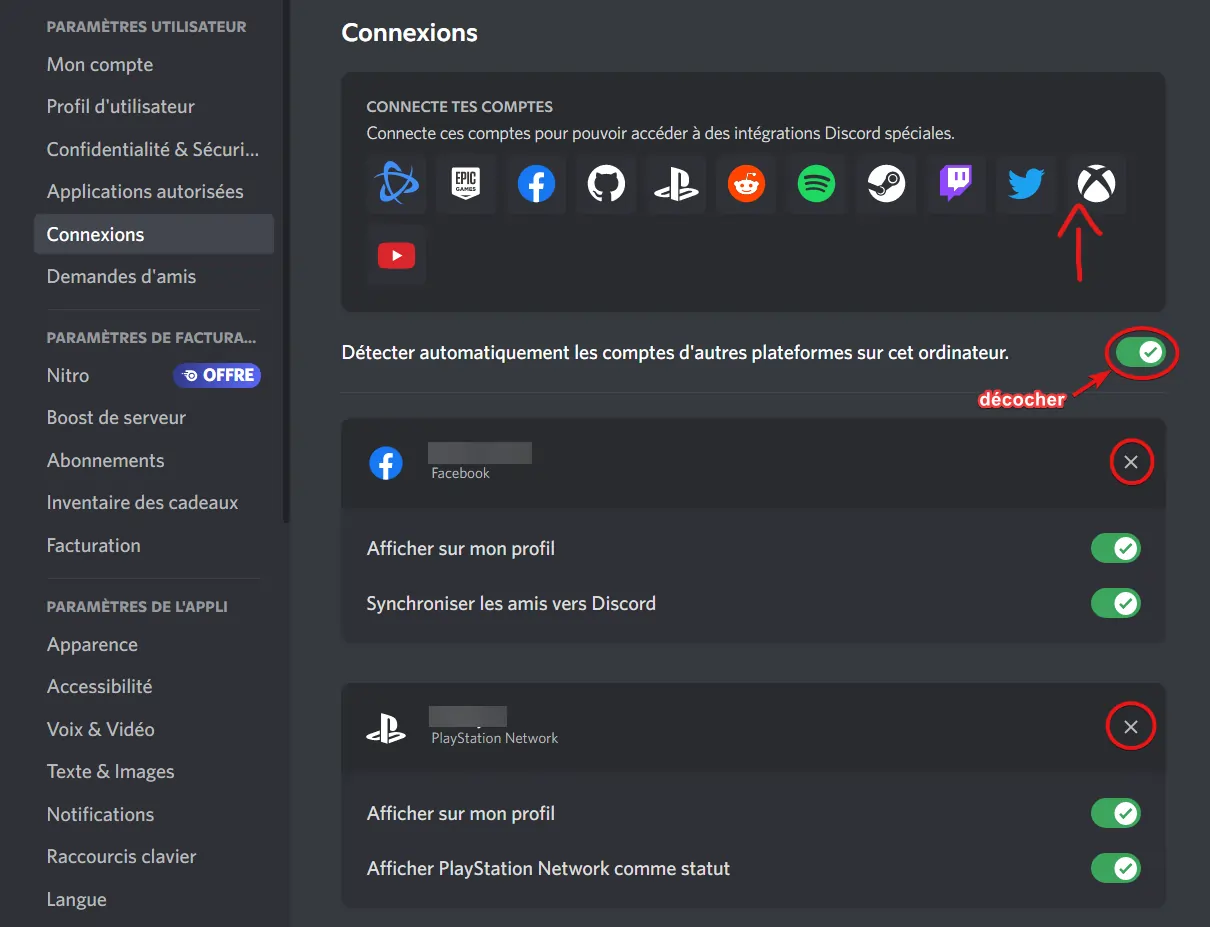

If you must link one or more accounts, uncheck the display on your profile:
- Don’t use any selfbot, injection client (BetterDiscord-like), or any other client modifications.
- Never connect to a site that offers to log in with Discord (if the site’s database is compromised, information such as your username, Discord ID, email, password hash… will be available online. A recent example is discord.io).
If you still wish to use this feature on the sites that offer it, create another account specifically for this purpose by following the requirements in Zone 3.
- Treat every public server as a public forum: your messages, your connection times, and the voice channels you frequent are massively collected by third-party services, despite Discord’s ban on scraping.
- Use server profiles to compartmentalize your identities across communities: a distinct nickname per server (free), a per-server avatar and bio (Nitro).
ZONE 2 (Intermediate)
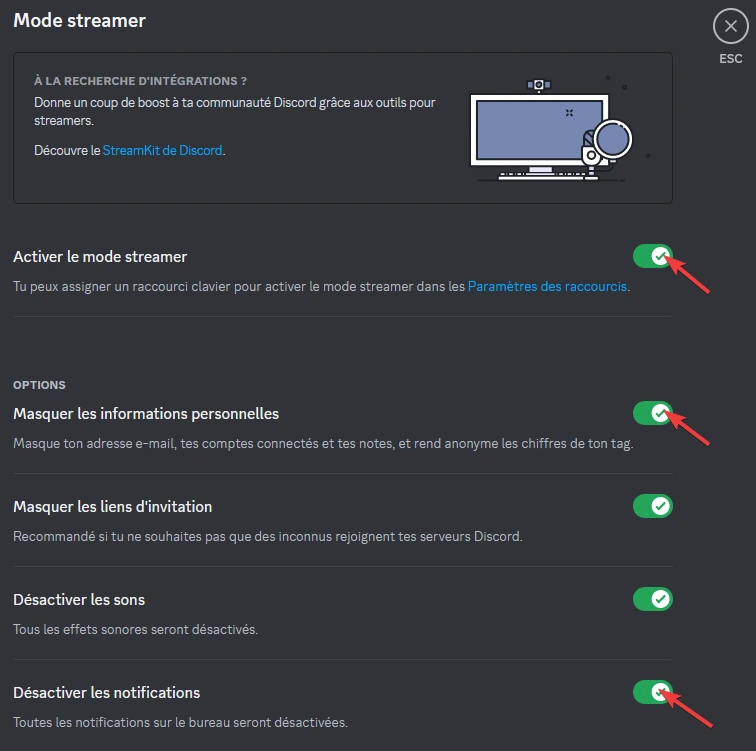
- If you share your screen, enable streamer mode:
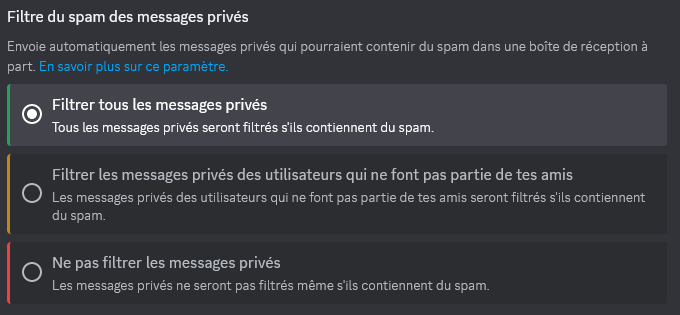
- Make sure “Filter all private messages” (spam) is enabled:
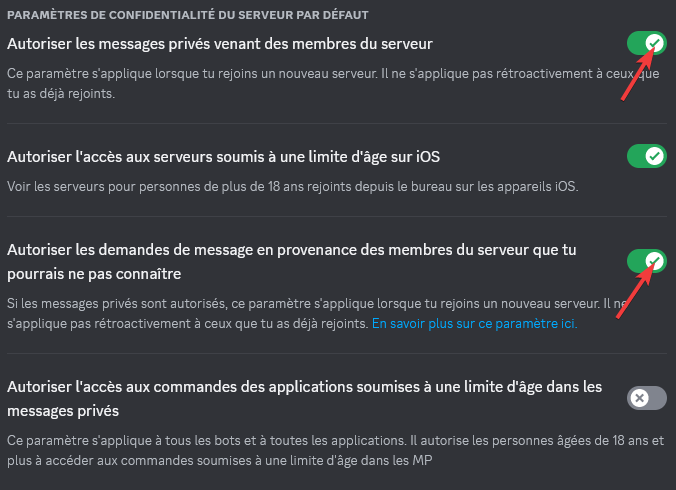
- Ensure “Allow private messages from server members” and “Allow message requests from server members you may not know” are disabled:
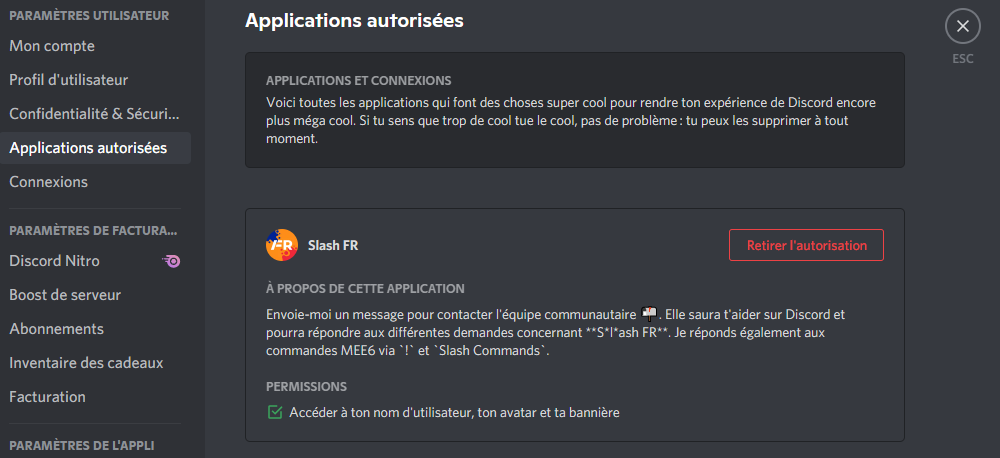
- Check the access that applications/bots/accounts have to your information: what information they can collect, what permissions are granted to them, and, if possible, revoke all authorizations.
-
Restrict who can send you friend requests (“Content & Social” then “Friend Requests”): at the very least, disable “Everyone”.
-
Disable the display of your current activity (“Activity Privacy” settings): your game status reveals in real time what you are doing, when, and for how long.
-
In “Data & Privacy”, disable the use of your data to “improve Discord” and for personalization: these options are enabled by default and only serve data collection.
ZONE 3 (Advanced)
-
Recreate an account with a fake identity fakenamegenerator (for example) to mitigate the potential data leak risk from the old account.
-
Use a unique email for Discord. Email aliases, take back control of your mails explains compartmentalization through aliases.
-
There have already been leaks on major third-party platforms:

-
Use a password that meets ANSSI’s requirements (complexity, storage and lifecycle, password manager highly recommended, e.g. KeePassXC) and enable multi-factor authentication. The dedicated MFA article explains factors, temporary codes, and the limits created by session theft.
-
For MFA, prefer an authenticator app or, better, a security key or a passkey (now supported by Discord), SMS being the weakest factor (SIM swap). Keep your backup codes in your password manager: with a throwaway email and phone number, losing MFA means losing the account.
-
For 2FA and verification, use a phone number unique to Discord (e.g. OnOff). Discord sometimes rejects VoIP numbers: a dedicated prepaid SIM card is the alternative.