Introduction to Git & Github
Published on 10 min read
Updated on
This tool has three main functions:
- Return to a previous version of your code in case of problems
- Track the evolution of your code step by step
- Work collaboratively without risking deletion of other contributors’ changes
How it works
Git works similarly to incremental backup, where a set of folders/files will be added to the project. Subsequently, a complete history of project changes will be available - these changes can be ignored, added, deleted or merged.
Git offers a branch system, which allows for example, to develop content on the main branch without altering it. This is because Git will have previously made a kind of secondary clone of the branch
(using the command git checkout -b mybranch).
-
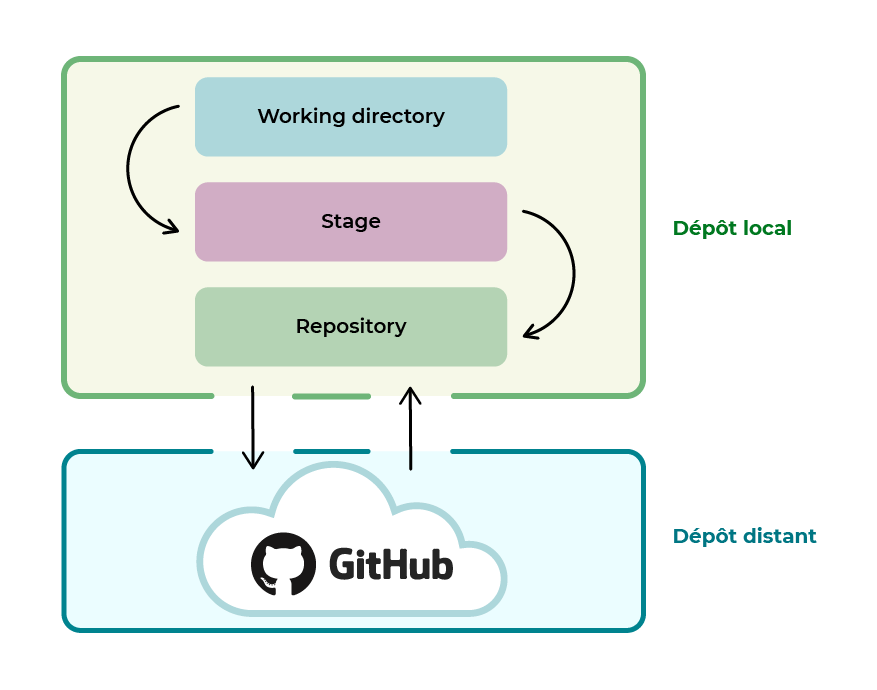
The Working directory corresponds to the project folder on the machine.
-
The Stage or Index is the intermediate stage representing all modified files that have been “staged”. See how to add folders and files to the repository.
-
The repository is the entire project with its commits.
Local repository
- A repository is the set of folders/files that make up a Git-initiated project.
- In online documentation or professional settings, we often talk about repositories.
- The local repository is stored directly on the machine.
Remote repository
- The remote repository is hosted on a remote server
Initialize a repository
Go to the desired directory, for example: cd ~/myproject
tip: Using 'master' as the name of the initial branch. This default branch nametip: is subject to change. To configure the initial branch name for all newtip: repositories, and suppress this warning, run:tip:tip: git config --global init.defaultBranch <name>tip:tip: Names commonly chosen instead of 'master' are 'main', 'trunk' andtip: 'development'. The newly created branch can be renamed with:tip:tip: git branch -m <name>Empty Git repository initialized in /home/contact/contactit.fr/.git/Cloning into 'myproject.git'...remote: Enumerating objects: 11779, done.remote: Counting objects: 100% (82/82), done.remote: Compressing objects: 100% (66/66), done.remote: Total 11779 (delta 52), reused 33 (delta 16), pack-reused 11697Receiving objects: 100% (11779/11779), 23.50 MiB | 11.34 MiB/s, done.Resolving deltas: 100% (7047/7047), done.The git clone command will directly import the project and its source files into a folder with its name.
- It may be necessary to update the repository following a change made by another project contributor, use the command:
git pull origin mybranchVerification
total 12drwxr-xr-x 3 contact contact 4096 Sept. 5 15:26 .drwxr-x--- 14 contact contact 4096 Sept. 5 15:23 ..drwxrwxr-x 7 contact contact 4096 Sept. 5 15:26 .gitThe .git repository is present in the directory in the form of a hidden folder.
Adding folders/files to repository:
The git add command allows you to index files to Git.
- Once the folders/files are indexed, it is possible to make a commit after modifying an element.
Some examples:
git add READMEadds theREADMEfilegit add .adds all folders and files in the directory where.gitis located.
.gitignore
.gitignoreis a file that lists the folders/files ignored by Git.- It follows a defined syntax.
Some examples:
*.logignores all files with the.logextension/folderignores the folder recursively.
More information is available here
Commits
A “commit” is a version of the previously indexed folders/files, which is different from the subsequent version.
- The
git commitcommand allows you to validate the changes made to the indexed or “staged” files by Git.
Installation of Git
[sudo] Password for contact:Reading package lists... DoneBuilding dependency tree... DoneReading state information... Donegit is already the newest version (1:2.34.1-1ubuntu1.4).git set as "manually installed"0 upgraded, 0 newly installed, 0 to remove and 0 not upgraded.1 partially installed or removed.After this operation, 0 B of additional disk space will be used.Do you want to continue? [Y/n]- Validate the installation:
Yor add the-yoption at the end of the command.
Identity
Identity in Git is simply your name and your email address.
These two pieces of information are necessary for Git validation:
-
git config --global user.name "John Doe" -
git config --global user.email contact@contactit.fr
- To check that your settings have been taken into account, simply pass the command:
git config --list
Push the repository
Add the remote origin
Terminal window git remote add origin https://github.com/username/project/myproject.gitSelect the branch
Terminal window git branch -M mybranchPush the repository
Terminal window git push -u origin mybranch
Branches
-
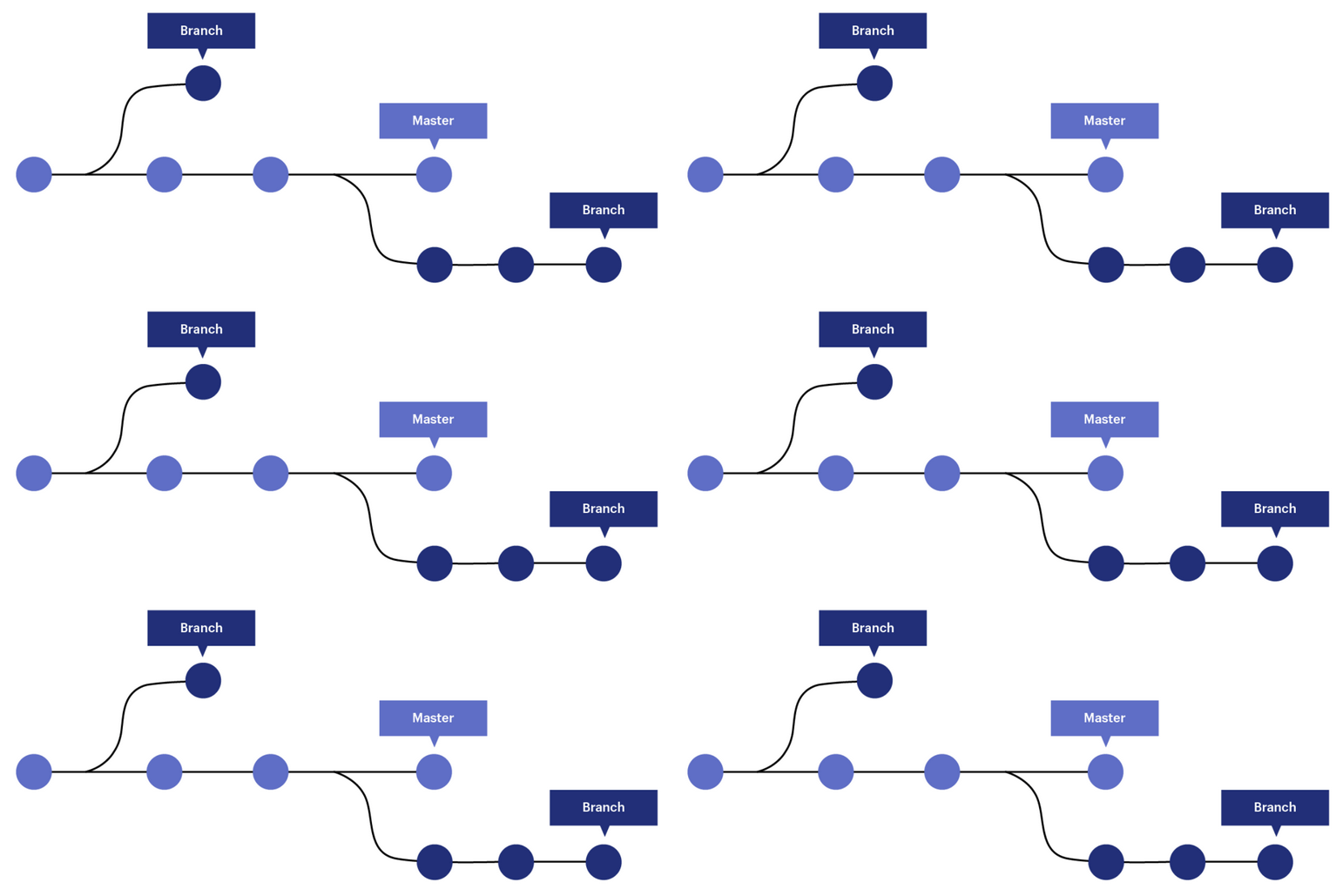
A branch is a copy of the project at a given time
T, all modifications made to it will only affect that one. This allows you to have multiple states of the project at the same time. -
The main branch is the
mainbranch (previously calledmasterbefore October 2020). This branch is often the production branch, therefore stable, of the project. -
There may be other branch names like:
devorstaging, these are non-stable development branches, tests and verifications will be made on them once the development is finished. -
If the result is conclusive, it may be possible to merge these branches to the
mainormasterbranch. Branches are often used to recreate a test / preproduction and production environment.
Git can be compared to a tree:
-
The trunk of the tree is the main branch of the project (most of the time: main or master)
-
The branches are elements that come from the trunk but go in different directions
-
The leaves are one on top of the other, more or less numerous and fall or remain on the branches like commits.
-
Conclusion: in winter there are more commits
-
The
git branchcommand allows you to list the branches of the repository:
list* master- Here there are two branches: list and master now main.
The
*indicates that I am currently in the master branch.
- The
git checkout mybranchcommand allows you to change branches:
Switched to branch 'mybranch'- It is possible to create a branch from a commit with one of the following commands:
git checkout -b mynewbranch <commit_sha>- To get the
sha(hash) of the commit, we can use the command:
* 5aaf865 Deletion of README* 6746dbc Adding test text* 931dc0f Creation of READMEThe sha is made up of the hexadecimal characters after the ”*” 931dc0f, for example.
Git stash
-
The
git stashcommand allows you to put a commit aside so that the current branch becomes clean, therefore without data in the stage area. This situation is suitable when a commit has not been made and the modifications are still in the stage. -
In practice, the
git statuscommand returns that there are several changes (in the stage area) that have not been committed. -
Stashallows you to put them aside, to be able to insert them into another branch, which can be useful when you have made a mistake in the branch! -
After executing the
git stashcommand if you run thegit statuscommand again, it returns that the working directory is clean (stage empty). -
Now I can go to a new branch or an existing one before inserting the changes made:
git branch mynewbranchgit checkout mynewbranch* mynewbranchmastergit stash applyGit reset
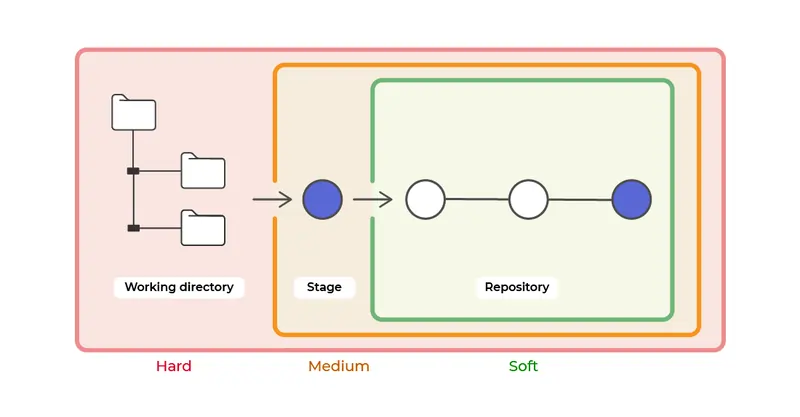
- Git reset allows you to undo changes in three different ways:
soft,mixedandhard
Delete the last commit
- First, look at the logs and therefore the last commit made and its identifier:
ca83a6dff817ec66f443420071545390a954664949 Author: contact<contactit[.]yarka(at)slmail.me> Date: Mon Mar 19 21:52:11 2022 -0700-
Note the identifier:
ca83a6dff817ec66f443420071545390a954664949if you need to assign it to another branch after deleting it. -
Now I can delete the last commit with the command:
git reset --hard HEAD^Github authentication
Github relies on authentication with SSH, therefore a pair of keys.
Generate an SSH key pair
ssh-keygen -t ed25519 Generating public/private ed25519 key pair.Enter file in which to save the key (/home/contact/.ssh/id_ed25519):Created directory '/home/contact/.ssh'.Enter passphrase (empty for no passphrase):Enter same passphrase again:Your identification has been saved in /home/contact/.ssh/id_ed25519Your public key has been saved in /home/contact/.ssh/id_ed25519.pubThe key fingerprint is:SHA256:myhash contact@mydomainThe key's randomart image is:+--[ED25519 256]--+|%@+. ||EBCVB. ||+=Bo. ||+.o* . ||oo..o . S S ||=+oo o ||B++ o . . ||+=.. o . ||o. . . |+----[SHA256]-----+Get the public key
cat ~/.ssh/id_ed25519.pub ssh-ed25519 AAAAC3NzaC1lZDI1NTE5AAAAKC91uWop9DhfNh23i6u0yUlhEkGv0IOQKzhU5ltKBkAG contact@contactit.frAdd the key to GitHub
Go to
Settings > SSH and GPG keys, in the title section put any name and in the key section paste your public key, then validate withAdd SSH key.
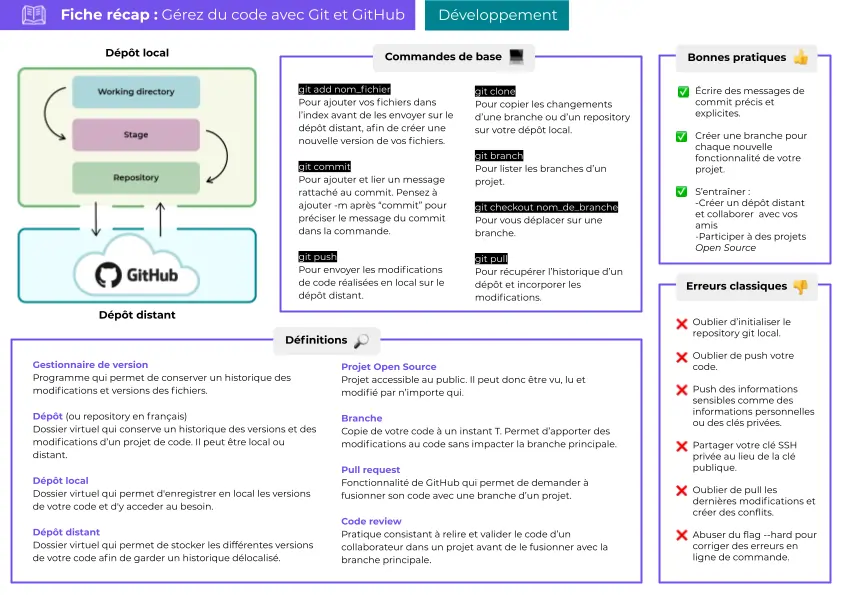
Summary of Git/Github
Once repository operations and authentication are familiar, the static deployment workflow with GitHub, Vercel, and Cloudflare shows how commits become a build and publication pipeline.